Detection engineering is hard, help your AI
Many of us use AI in some form or another every day in our jobs. As someone who works in cybersecurity, I’m no different. When people talk about AI in the context of a SOC, many think about writing threat reports from online sources or closing alerts with a lot of tokens. But I think one discipline in security is still far from solved by AI: detection engineering.
If you let any AI out there create a KQL detection they come up with the correct table names, in many cases even the columns, but often it ends when they hallucinate ActionTypes or completely miss how the XML is stored inside of one of the columns. And this is where a generated detection that looks good and runs well but never could detect anything can be more than harmful, it can lead to a false sense of protection and to missing alerts.
Many of these shortcomings come from the lack of public sources for these data points. That’s why I wanted to help my AI assistant and everyone else in the same position.
The result is xdrinternals.com.
What is XDR Internals?
In the beginning, the website xdrinternals.com was intended as a public reference for the available tables in Microsoft Defender XDR, the columns in each table, and the available ActionTypes. But then Nathan McNulty and I released a PowerShell module with the same name that allows you to interact with the internals of the Defender XDR portal, and I wanted to add documentation for these cmdlets to the website as well.
While working on and automating the website’s update process, I didn’t want to stop there. The public website offers the information just described, but now includes many more features.
Let’s explore the different parts of the website in more depth.
Schema explorer
The schema explorer is exactly what I just described in regards to the tables, but you might have seen the “Extended information” filter. Behind this small filter there is a lot more information.

For example, the CloudAppEvents table has many different ingestion sources. These range from Azure and Microsoft 365 to third-party logs such as AWS, and each source stores data in the RawEventData column differently.
These fields are not documented anywhere, which makes it hard for both people and AI agents to generate correctly formatted KQL queries.
In XDR Internals, I now provide data for many of these fields in the form of JSON schemas and samples.
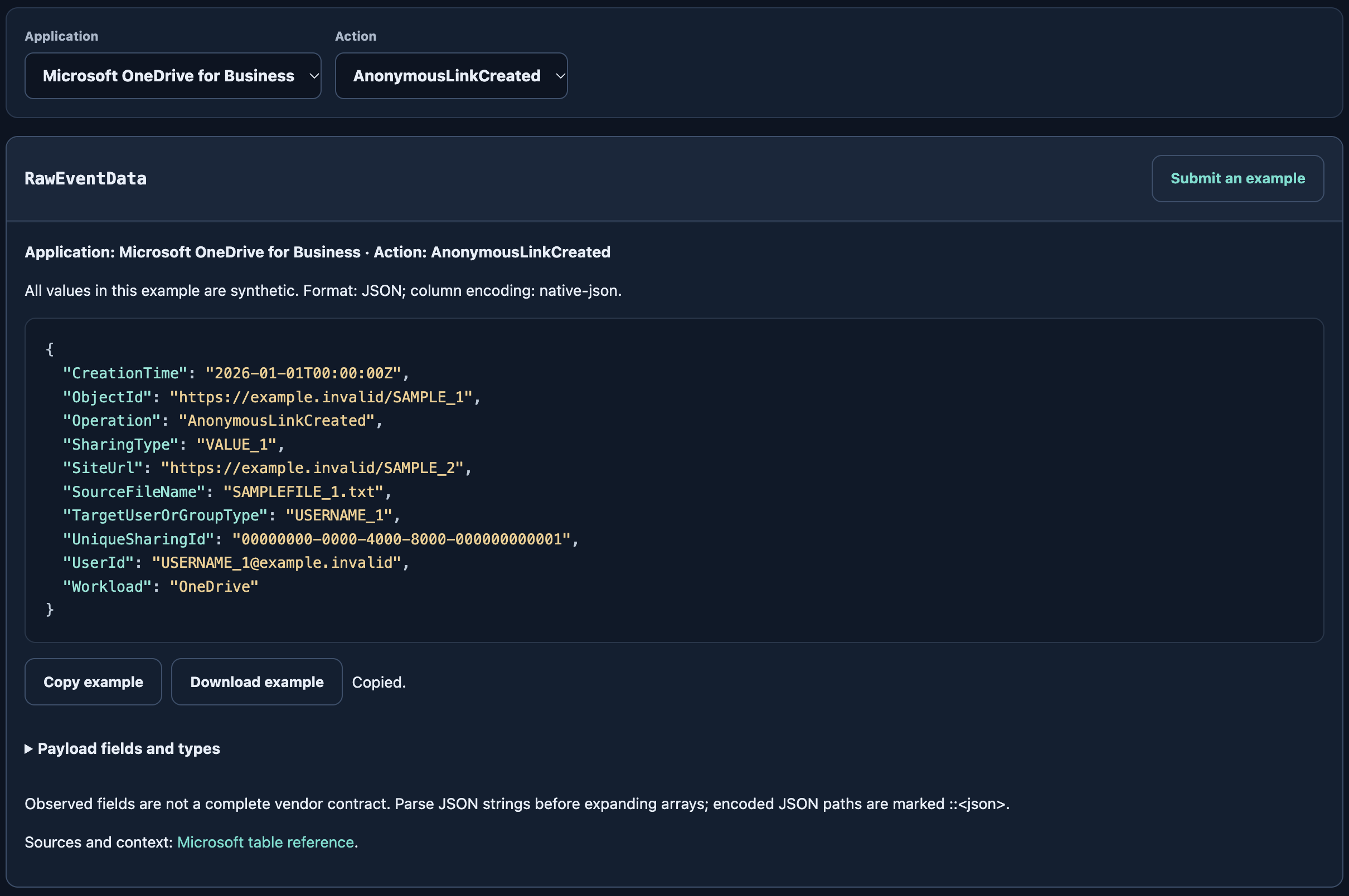
Of course, I don’t have all the examples myself, so if you want to contribute to the project, you can do so through the XDRSchemaExamples repository. This public repository lets you submit JSON schemas from your environment without exposing PII or sensitive data.
I provide PowerShell scripts that export structured samples and do their best to remove any PII. Follow the project README and double-check the output before submitting a PR; the repository explains the process step by step.
Relationship map
One of the big strengths of the data in XDR and Sentinel is not the sheer amount of information but the relationships you can build between records. These relationships e.g. let you track a sign-in event and related actions in your tenant by using the access token ID (UniqueTokenIdentifier) and the refresh token (Session ID).
These fields are not named consistently across tables, and sometimes they are hidden deep in nested fields.
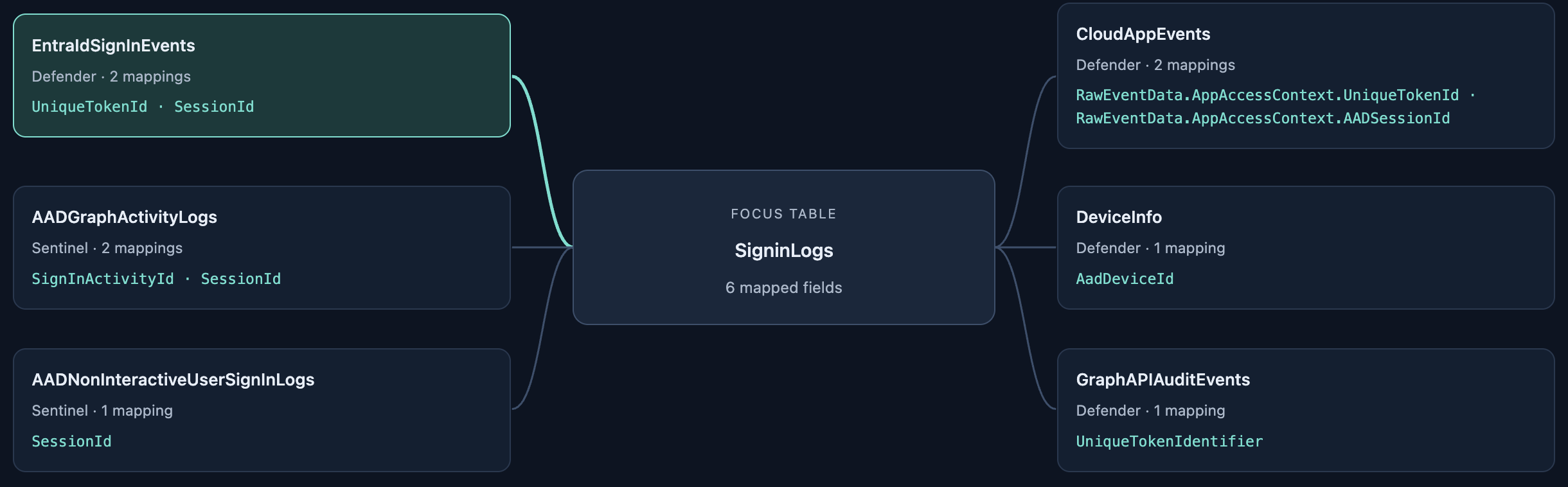
The XDR Internals relationship map helps you explore these relationships and makes it easier to find the correct events in other tables. You can switch between table-centric and field-centric views.

Thanks to Olaf Hartong for many of these relationships. The documentation also indicates whether a lookup should be case-sensitive and describes other known quirks.
JSON documentation
While I provide this data in a (hopefully) appealing way for humans, the underlying data is also available as JSON documents. You can find the links in the footer of the website or just here:
Structured column examples JSON
MCP Server
And since it’s 2026, you can point your beloved little helper at the MCP Server and let it consume this knowledge. If you do, you’ll soon discover that the MCP server offers benefits beyond tables and relationships.
The setup is quite easy: just add the MCP server to your favorite harness configuration and get started.
Claude Code
claude mcp add --transport http kql-validator https://mcp.xdrinternals.com/mcp
Codex Code
codex mcp add kql-validator --url https://mcp.xdrinternals.com/mcp
Opencode
opencode mcp add kql-validator --url https://mcp.xdrinternals.com/mcp
KQL Validation
Either through the MCP or a REST API you can validate if your KQL query produces valid KQL. The query itself is not executed against a real Sentinel or XDR instance but validated against the .NET implementation of KQL (Microsoft.Azure.Kusto.Language).
My hosted MCP does not log the KQL queries you provide, so at least I won’t steal your detection ideas. I can’t speak for OpenAI or Anthropic, though. If you want to host the validator yourself, you are free to do so.
The .NET implementation is strict, so some validation checks are relaxed to better match the behavior of XDR Advanced Hunting when you execute a query.
By default, the schema used is the one documented on XDR Internals. You can also submit custom table schemas, watchlists, or functions so that the validator can use them. Your AI agent can figure out how to do this; here is an example using Invoke-RestMethod.
$body = @{
    query = @'
ContosoAudit_CL
| where TimeGenerated > ago(7d)
| summarize Events=count() by Action
| order by Events desc
'@
    environment = "sentinel"
    profile = "general"
    extensions = @{
        tables = @(
            @{
                name = "ContosoAudit_CL"
                columns = @(
                    @{ name = "TimeGenerated"; type = "datetime" }
                    @{ name = "UserPrincipalName"; type = "string" }
                    @{ name = "Action"; type = "string" }
                    @{ name = "Result"; type = "string" }
                )
            }
        )
    }
} | ConvertTo-Json -Depth 10

$result = Invoke-RestMethod `
    -Method Post `
    -Uri "https://mcp.xdrinternals.com/api/v1/validate" `
    -ContentType "application/json" `
    -Body $body

$result
Linting
In my opinion, the best part about the MCP is another bit: KQL linting.
Based on Microsoft’s documentation and publicly available community best practices, I created a list of 71 rules that each KQL query can be checked against. There are different severities that influence what your AI agent will do with them. Anything with an error will lead the AI agent to optimise the KQL query until it’s gone, warnings might be ignored if the agent “thinks” there is a valid reason, and informational recommendations might be considered if the AI agent thinks there is a benefit.
These rules are split into Sentinel Analytics Rules (ANR), XDR Custom Detections (CUD) and Azure Monitor Transformations (as in Data Collection Rules) and also differ between near-real-time and scheduled queries.
Armed with this knowledge, you can now easily validate existing or newly written KQL queries against the MCP. A query like this
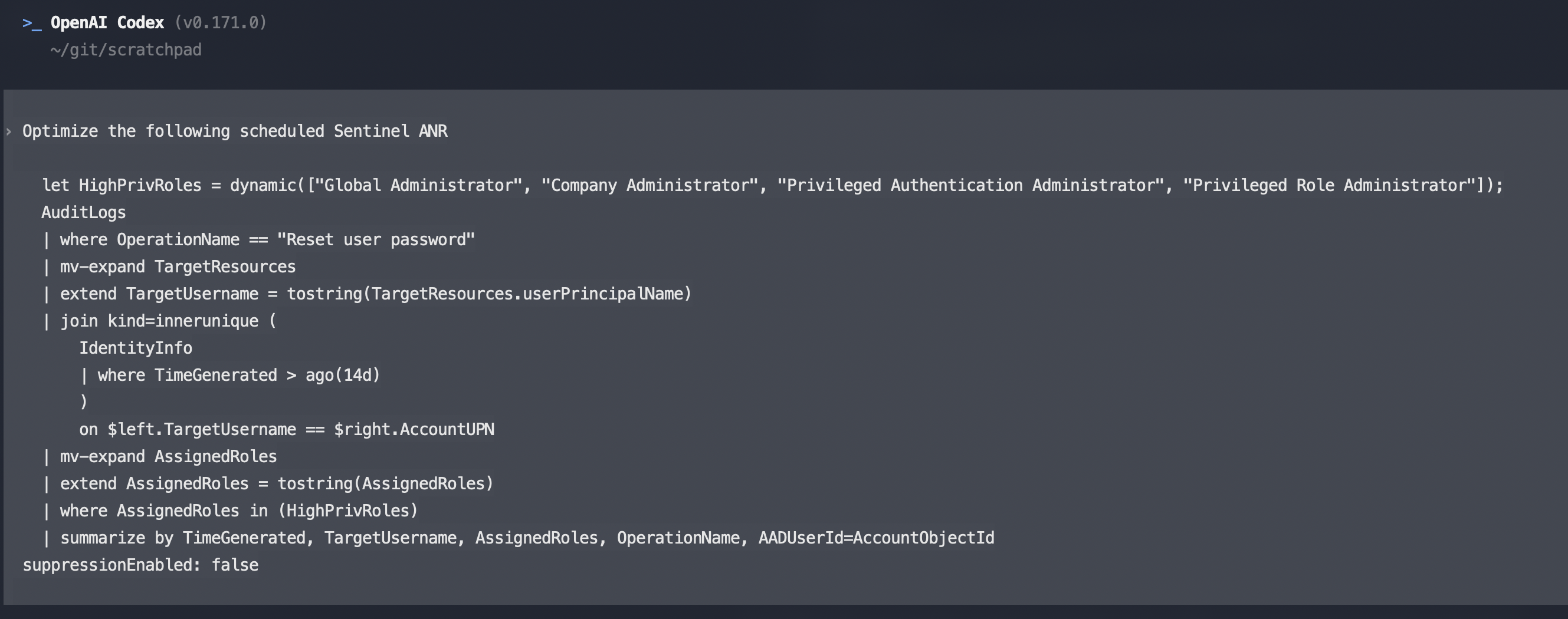
will be changed into this.
let HighPrivRoles = dynamic([
    "Global Administrator",
    "Company Administrator",
    "Privileged Authentication Administrator",
    "Privileged Role Administrator"
]);
let PrivilegedUsers =
    IdentityInfo
    | where TimeGenerated > ago(14d)
    | mv-expand Role = AssignedRoles
    | where tostring(Role) in (HighPrivRoles)
    | project AccountUPN, AccountObjectId, AssignedRoles = tostring(Role)
    | summarize by AccountUPN, AccountObjectId, AssignedRoles;
AuditLogs
| where OperationName == "Reset user password"
| mv-expand TargetResources
| extend TargetUsername = tostring(TargetResources.userPrincipalName)
| join kind=inner (PrivilegedUsers)
    on $left.TargetUsername == $right.AccountUPN
| project TimeGenerated, TargetUsername, AssignedRoles, OperationName,
          AADUserId = AccountObjectId
| summarize by TimeGenerated, TargetUsername, AssignedRoles,
              OperationName, AADUserId
You might think there is not a lot of difference, but a total of five linting rules lead to the improved KQL query design.
- KQLH007 - Filter on calculated column: the role filter comes before converting the role to a string for output. The first draft triggered this warning; I adjusted the order.
- KQLH009 - Join without explicit kind: the query specifies
kind=inner. - KQLH012 - Late selective filter: the operation and role filters are applied before the join.
- KQLD001 - Sentinel output omits
TimeGenerated: the final output retainsTimeGenerated. - KQLD006 - Row limit in alert query: the query doesn’t use
takeorlimit.
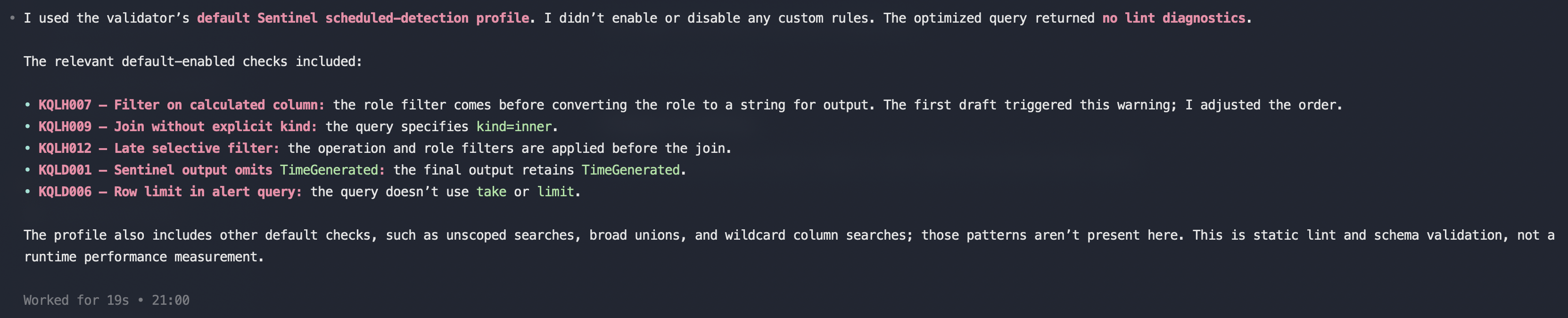
By default, the community-based linting rules are optional, but I highly recommend using them alongside official Microsoft guidance. In this example, the optional community rules did not require any changes, though they might suggest changes in other cases.
Conclusion
While these features make it easier to write valid and optimised KQL queries, detection engineering should not be left entirely to an AI agent. The discipline requires more than a valid query: the query must alert when a threat is detected. You must verify this by testing the results, validating the query against real or simulated threats, and deploying it in your environment.
AI can help at many steps along the way, but it should not be left unattended if you value your environment and take threat actors seriously.
With that in mind, arm your AI agent with additional knowledge and “Happy hunting”.